![Intuto-Logo-2019-RGB-600x600px-transparent.png]](https://support.intuto.com/hs-fs/hubfs/website/assets/img/logos/Intuto-Logo-2019-RGB-600x600px-transparent.png?width=40&height=40&name=Intuto-Logo-2019-RGB-600x600px-transparent.png)
To see a report of the CPD points issued on your site you need to:
Accessing the Report
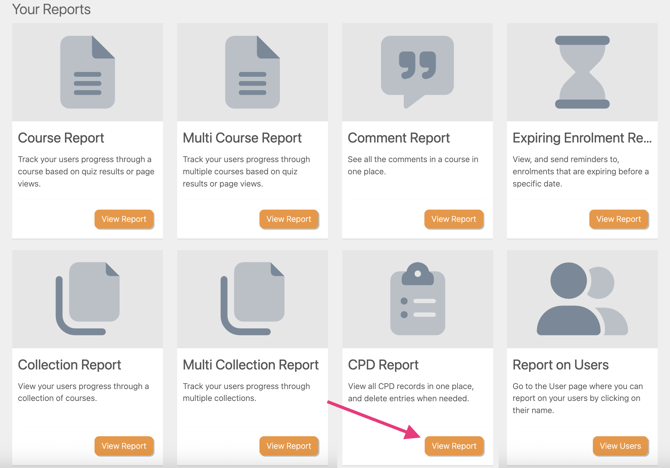
You can access the CPD report from your Reports page. Click Reports and then View Report in the CPD section.
Reading the Data
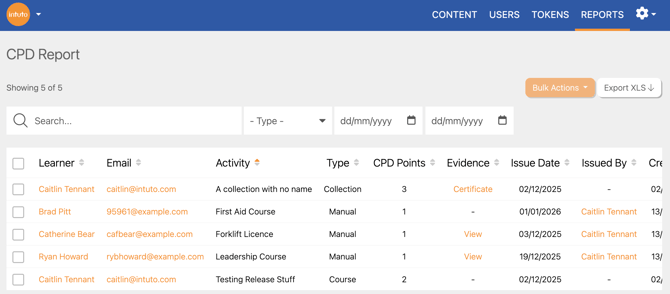
You will see a list of the CPD points issued on your site.
The details will include:- Learner name
- Learner email address
- The course/collection/CPD activity name entered
- The type of CPD
- The number of CPD points issued
- Any evidence of the CPD
- The date the CPD points were issued
- Who they were issued by (if added manually)
- The date the CPD record was created
You can search for specific learners or a specific activity name by typing in the search bar. You can also use the dropdown boxes to filter by CPD type (course, collection or manually issued) as well as date.
To view more details about the learner and their progress, click the name or email address of the user to view the User Report. Find out more about User Reports here.
Click the button in the Evidence column to view the certificate or uploaded evidence for the CPD record.
Exporting the Report
Click Export Report at any time to download an excel spreadsheet (.xlsx file) of the data currently displayed on screen. This can then be filtered, shared or stored as needed.
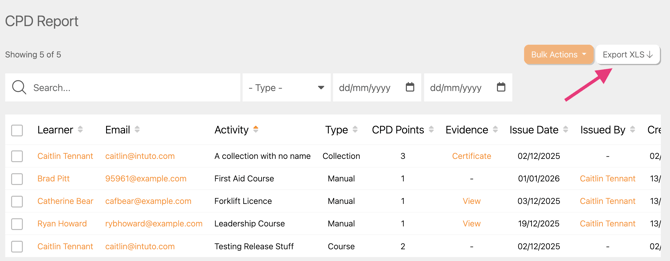
Note: Your exported report will reflect any search filters you have applied (name, course/collection, date) so make sure these are correct.
Contact us at support@intuto.com for further help with the CPD Report.