![Intuto-Logo-2019-RGB-600x600px-transparent.png]](https://support.intuto.com/hs-fs/hubfs/website/assets/img/logos/Intuto-Logo-2019-RGB-600x600px-transparent.png?width=40&height=40&name=Intuto-Logo-2019-RGB-600x600px-transparent.png)
A qualification represents a CPD goal or credential. For example, Annual Membership Renewal.
A cycle is a time-bound instance of a qualification. For example, the Annual Membership Renewal for 2026. Cycles have a start and end date and a required number of points.
Courses and collections are linked to qualifications. When a learner completes one of these, the points are automatically attributed to the relevant qualification, and count toward any active cycle for it.
You can:
To finish setting up your CPD programme in Intuto, you can also learn how to configure you CPD settings and how to award and track CPD points.
Create a qualification
To create a qualification, access your the CPD Qualifications page of your Site Settings and click Create Qualification in the top right:

You'll see the following:
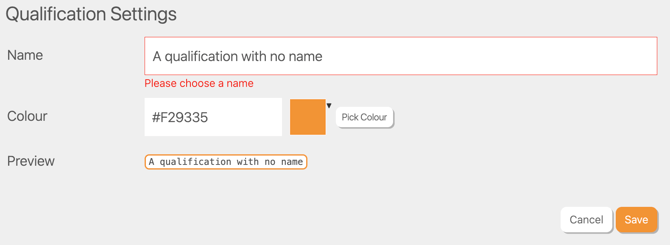
Name - Give your qualification a clear name that your learners will recognise, such as “Annual Membership Renewal”
Colour - Optionally select a colour to help differentiate qualifications at a glance. A preview of your qualification label will appear at the bottom of the form.
Click Save in the bottom right. Your qualification will now appear in the list on screen.
Note: You can create multiple qualifications to cater to different member types or programme streams.
Create a cycle
Once your qualification is set up, access the CPD Cycles page and click Create CPD Cycle in the top right.
You'll see the following:
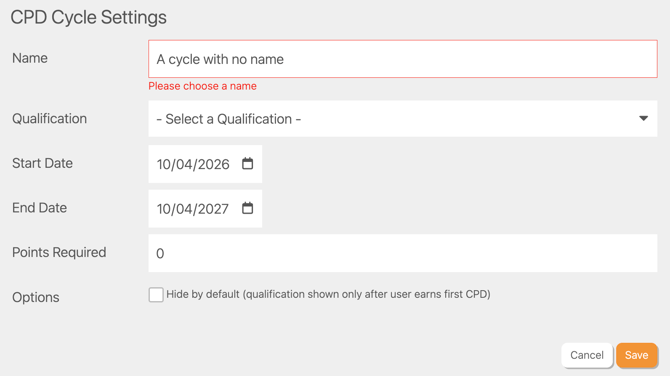
Name - Give the cycle a name that identifies the period, such as “2026” or “2026–2027”.
Qualification - Select the qualification this cycle belongs to.
Start and end dates - Only CPD earned within these dates will count toward this cycle.
Points required - Set the number of CPD points a learner needs to earn to complete this cycle (e.g. 10 points).
Options
Hide by default - Tick this to hide the qualification from learners until they start earning CPD that applies to it.
Click Save in the bottom right. Your cycle will appear in the list and is now ready to receive CPD points.
Link courses and collections to a qualification
CPD points need to be connected to a qualification so they count toward a cycle. You can do this from the course or collection settings.
Linking a course
To link a course to a qualification, edit the course and go to the course settings page.Scroll down to the CPD section:
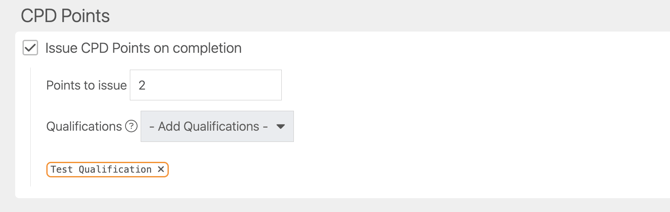
Tick Issue CPD points on completion. Enter the number of points to be issued once this course is complete, and select up to five qualifications for the course to apply to. Then publish the course to save your settings.
Any future completions of this course will be awarded the CPD points and have those CPD attributed to the selected qualification(s) and any active cycle.
Linking a collection
To link a collection to a qualification, go to the Collection page in your Site Settings. Locate the Collection you want to add to a Qualification and click the pencil icon on the far right to access the Collection Editor.
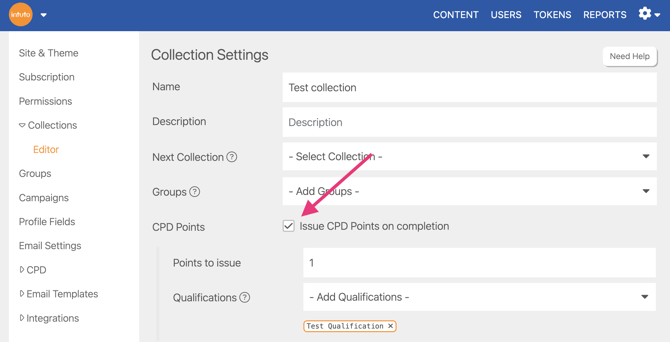
In the CPD points section, tick Issue CPD points on completion. Enter the number of points to be issued once this collection is complete, and select up to five qualifications for the collection to apply to.
Once you are happy with your collection settings, click Publish Changes in the bottom right of the collection to save your settings.
Any learner who completes this collection after it has been published will automatically receive the points, and have those CPD attributed to the relevant qualification(s) and any active cycle.
View the Cycles and Qualifications from the learner perspective
Learners can view their progress against any active qualification and cycle from the CPD Cycles and CPD tabs on their content page.

On the CPD Cycles tab they will see:
- The Cycle name and time period.
- The associated qualification.
- How many points they have earned so far, and how many are required.
- A visual representation of how far through the qualification they are.
Learners can download a CPD Cycle transcript, which lists all their activities related to this cycle and is useful for sharing with other organisations or to keep for their own records.
To view past cycles, learners can click Show Past in the top right.
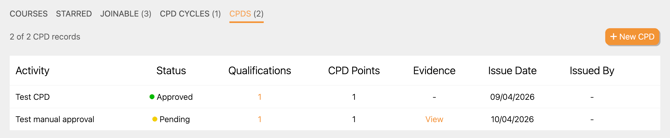
On the CPD tab they will see:
- The CPD activity name.
- The CPD activity status.
- The associated qualification.
- How many points are associated with the activity.
- Any evidence that is associated with the CPD.
- When the CPD was issued.
- If applicable, who the CPD was issued by.
Please contact us at support@intuto.com if you have any questions about CPD Cycles ad Qualifications.